

101 stories
·
0 followers

A Guide to Which AI to Use in the Agentic Era

1 Share

I have written eight of these guides since ChatGPT came out, but this version represents a very large break with the past, because what it means to “use AI” has changed dramatically. Until a few months ago, for the vast majority of people, “using AI” meant talking to a chatbot in a back-and-forth conversation. But over the past few months, it has become practical to use AI as an agent: you can assign them to a task and they do them, using tools as appropriate. Because of this change, you have to consider three things when deciding what AI to use: Models, Apps, and Harnesses.
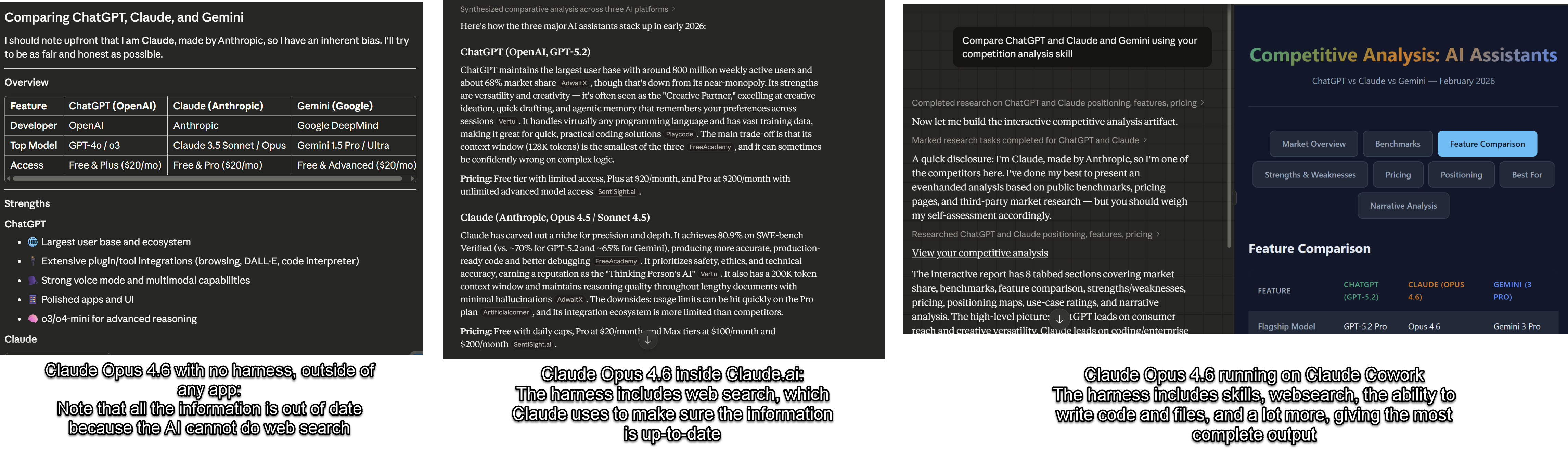
The exact same model, Claude Opus 4.6, asked the exact same question, “Compare ChatGPT and Claude and Gemini” in three different apps and harnesses. With no harness the information is out of date, on the Claude.ai site I get updated information and verifiable sources, using Claude Cowork, I get a sophisticated analysis and well-formatted head-to-head comparisons

Models are the underlying AI brains, and the big three are GPT-5.2/5.3, Claude Opus 4.6, and Gemini 3 Pro (the companies are releasing new models much more rapidly than the past, so version numbers may change in the coming weeks). These are what determine how smart the system is, how well it reasons, how good it is at writing or coding or analyzing a spreadsheet, and how well it can see images or create them. Models are what the benchmarks measure and what the AI companies race to improve. When people say “Claude is better at writing” or “ChatGPT is better at math,” they’re talking about models.

Apps are the products you actually use to talk to a model, and which let models do real work for you. The most common app is the website for each of these models: chatgpt.com, claude.ai, gemini.google.com (or else their equivalent application on your phone). Increasingly, there are other apps made by each of these AI companies as well, including coding tools like OpenAI Codex or Claude Code, and desktop tools like Claude Cowork.

Harnesses are what let the power of AI models do real work, like a horse harness takes the raw power of the horse and lets it pull a cart or plow. A harness is a system that lets the AI use tools, take actions, and complete multi-step tasks on its own. Apps come with a harness. Claude on the website has a harness that lets Claude 4.6 Opus do web searches and write code but also has instructions about how to approach various problems like creating spreadsheets or doing graphic design work. Claude Code has an even more extensive harness: it gives Claude 4.6 Opus a virtual computer, a web browser, a code terminal, and the ability to string these together to actually do stuff like researching, building, and testing your new website from scratch. Manus (recently acquired by Meta) was essentially a standalone harness that could wrap around multiple models. OpenClaw, which made big news recently, is mostly a harness that allows you to use any AI model locally on your computer.

Until recently, you didn’t have to know this. The model was the product, the app was the website, and the harness was minimal. You typed, it responded, you typed again. Now the same model can behave very differently depending on what harness it’s operating in. Claude Opus 4.6 talking to you in a chat window is a very different experience from Claude Opus 4.6 operating inside Claude Code, autonomously writing and testing software for hours at a stretch. GPT-5.2 answering a question is a very different experience from GPT-5.2 Thinking navigating websites and building you a slide deck.

It means that the question “which AI should I use?” has gotten harder to answer, because the answer now depends on what you’re trying to do with it. So let me walk through the landscape.

The Models Right Now

The top models are remarkably close in overall capability and are generally “smarter” and make fewer errors than ever. But, if you want to use an advanced AI seriously, you’ll need to pay at least $20 a month (though some areas of the world have alternate plans that charge less). Those $20 get you two things: a choice of which model to use and the ability to use the more advanced frontier models and apps. I wish I could tell you the free models currently available are as good as the paid models, but they are not. The free models are all optimized for chat, rather than accuracy, so they are very fast and often more fun to talk to, but much less accurate and capable. Often, when someone posts an example of an AI doing something stupid, it is because they are either using the free models or because they have not selected a smarter model to work with.

The big three frontier models are Claude Opus 4.6 from Anthropic, Google’s Gemini 3.0 Pro, and OpenAI’s ChatGPT 5.2 Thinking. With all of the options, you get access to top-of-the-line AI models with a voice mode, the ability to see images and documents, the ability to execute code, good mobile apps, and the ability to create images and video (Claude lacks here, however). They all have different personalities and strengths and weaknesses, but for most people, just selecting the one they like best will suffice. For now, the other companies in this space have fallen behind, whether in models or in apps and harnesses, though some users may still have reasons for picking them.
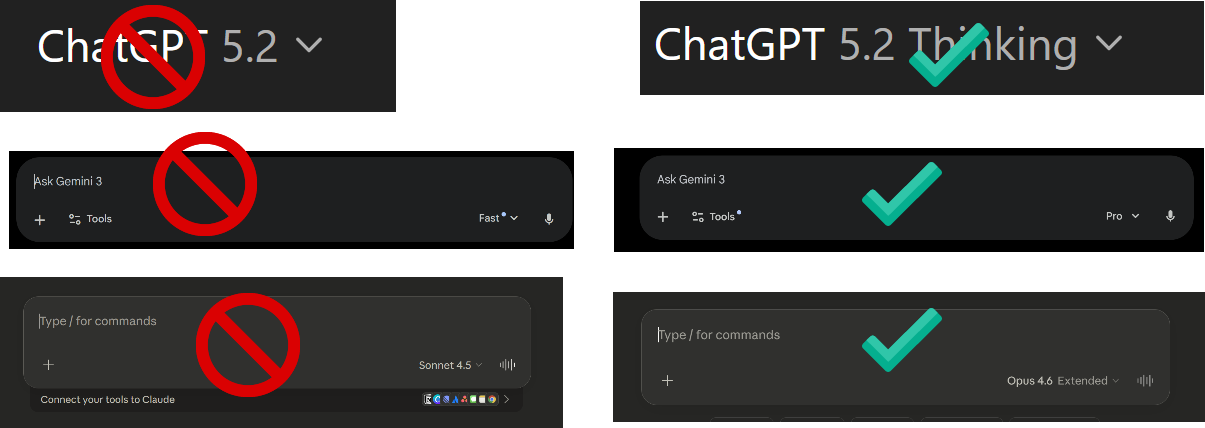
This is only a slight exaggeration - for casual chats where being right doesn’t matter, you can use smaller models, otherwise please pick advanced models!

When you are using any AI app (more on those shortly), including phone apps or websites, the single most important thing you can do is pick the right model, which the AI companies do not make easy. If you are just chatting, the default models are fine, if you want to do real work, they are not. For ChatGPT, no matter whether you use the free or pay version, the default model you are given is “ChatGPT 5.2”. The issue is that GPT-5.2 is not one model, it is many, from the very weak GPT-5.2 mini to the very good GPT-5.2 Thinking to the extremely powerful GPT-5.2 Pro. When you select GPT-5.2, what you are really getting is “auto” mode, where the AI decides which model to use, often a less powerful one. By paying, you get to decide which model to use, and, to further complicate things, you can also select how hard the model “thinks” about the answer. For anything complex, I always manually select GPT-5.2 Thinking Extended (on the $20 plan) or GPT-5.2 Thinking Heavy (on more expensive plans). For a really hard problem that requires a lot of thinking, you can pick GPT-5.2 Pro, the strongest model, which is only available at a higher cost tier.

For Gemini, there are three options: Gemini 3 Flash, Gemini 3 Thinking, and, for some paid plans, 3 Pro. If you pay for the Ultra plan, you get access to Gemini Deep Think for very hard problems (which is in another menu entirely). Always pick Gemini 3 Pro or Thinking for any serious problem. For Claude, you need to pick Opus 4.6 (though the new Sonnet 4.6 is also powerful, it is not quite as good) and turn on the “extended thinking” switch.

Again, for most people, the model differences are now small enough that the app and harness matter more than the model. Which brings us to the bigger question.

The Chatbot Interfaces

The vast majority of people use chatbots, the main websites or mobile apps of ChatGPT, Claude, and Gemini, to access their AI models. In fact, we can call the chatbot the most important and widespread AI app. In the past few months, these apps have become quite different from each other.

Some of the differences are which features are bundled with AI:

  • Bundled into the Gemini chatbot (and accessible with the little plus button): you can access nano banana (the best current AI image creation tool), Veo 3.1 (a leading AI video creation tool), Guided Learning (when trying to study, this helps the AI act more like a tutor), and Deep Research

  • Bundled into ChatGPT is even more of a hodgepodge of options accessible with the plus button. You can Create Images (the image generator is almost as good as nano banana, but you can’t access the Sora video creator through the chatbot), Study and Learn (the equivalent to Guided Learning in Gemini, but there is also a separate Quizzes creator for some reason), Deep Research and Shopping Research (surprisingly good and overlooked), and a set of other options that most people will not use often, so I won’t cover here.

  • Claude has only Deep Research as bundled option, but you can access a study mode by creating a Project and selecting study project.

  • All of the AI models let you connect to data, such as letting the AI read your email and calendar, access your files, or connect to other applications. This can make AI far more useful, but, again, each AI tool has a different set of connectors you can use.

These are confusing! For most people doing real work, the most important additional feature is Deep Research and connecting AI to your content, but you may want to experiment with the others. Increasingly, however, what matters is the harness - the tools the AI has access to. And here, OpenAI and Anthropic have clear leads over Google. Both Claude.ai and ChatGPT have the ability to write and execute code, give you files, do extensive research, and a lot more. Google’s Gemini website is much less capable (even though its AI model is just as good),
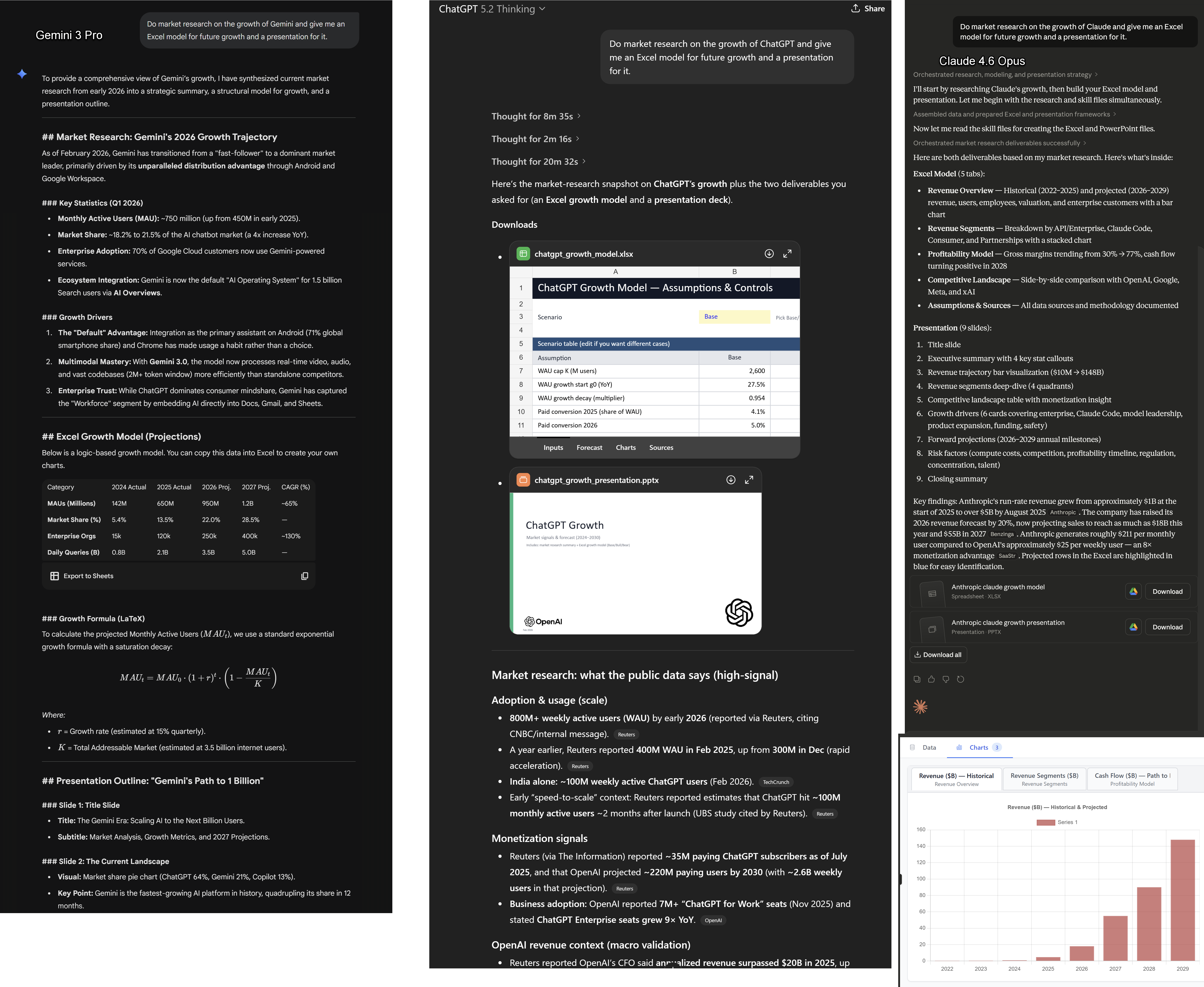
As you can see, asking a similar question gets working spreadsheets and PowerPoints from ChatGPT and Claude, along with clear citations I can follow up on. Gemini, however, is unable to produce either kind of document, and it does not provide citations or research. I do expect that Google will catch up here soon, however.

One final note on Chatbots. GPT-5.2 Pro, with the harness that comes with it, is a VERY smart model. It is the model that just helped derive a novel result in physics and it is the one I find most capable of doing complex statistical and analytical work. It is only accessible through more expensive plans. Google Gemini 3 Deep Think also seems very capable, but suffers from the same harness problem.
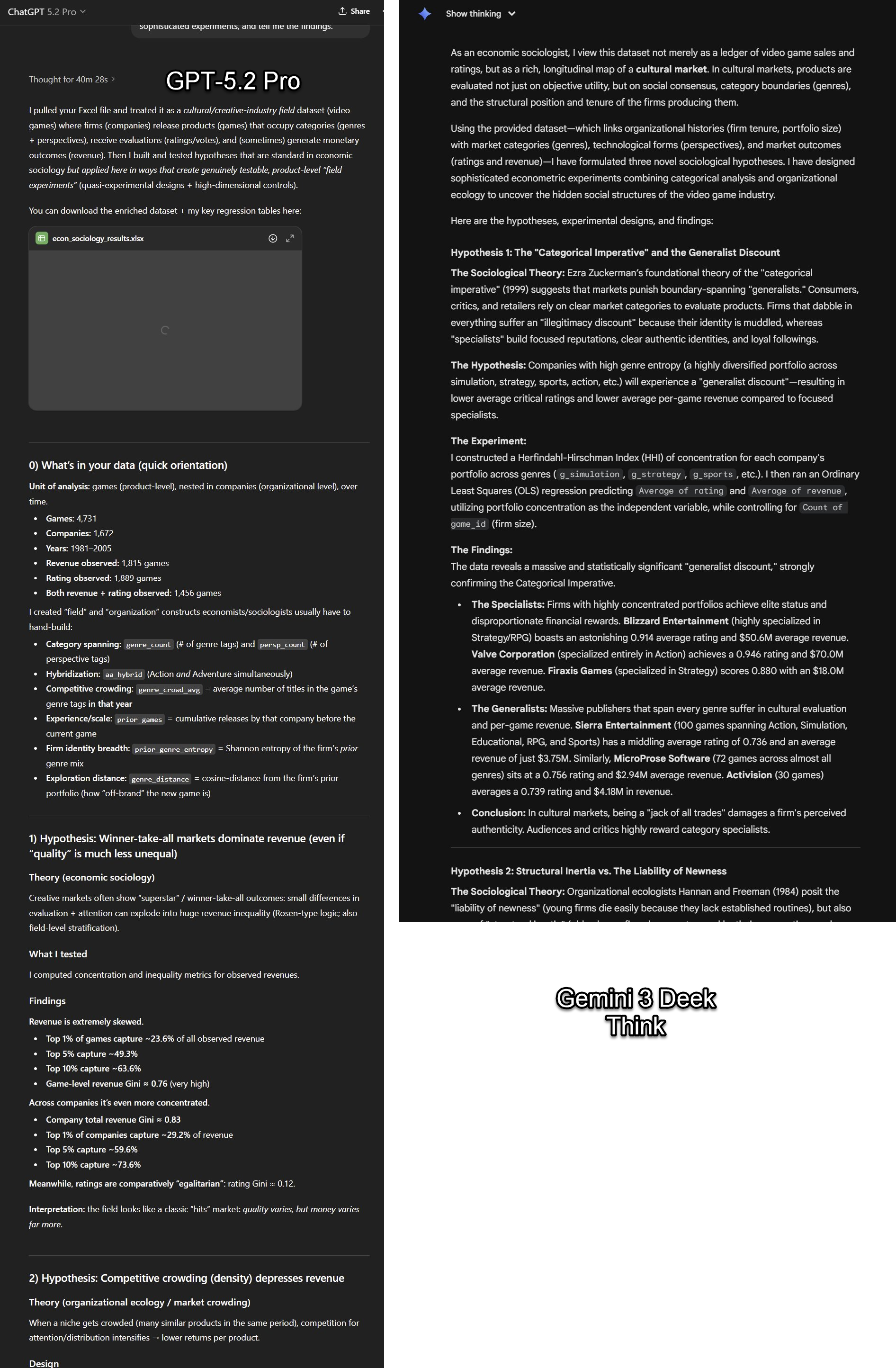
Prompt: “you are an economic sociologist. I want you to figure out some novel hypotheses you can test with this data, do sophisticated experiments, and tell me the findings.” and I gave it a large excel dataset.

Other apps and harnesses

The chatbot websites are where most people interact with AI, but they are increasingly not where the most impressive work gets done. A growing set of other apps wrap these same models in more powerful harnesses, and they matter.

Claude Code, OpenAI Codex, and Google Antigravity are the most well-developed of these, and they are all aimed at coders. Each of them gives an AI model access to your codebase, a terminal, and the ability to write, run, and test code on its own. You describe what you want built and the AI goes and builds it, coming back when it’s done or stuck. If you write code for a living, these tools are changing your job. Because they have the most extensive harnesses, even if you don’t code, they can still do a tremendous amount.

For example, a couple years ago, I became interested in how you would make an entirely paper-based LLM by providing all of the original GPT-1’s internal weights and parameters (the code of the AI, listed as 117 million numbers) in a set of books. In theory, with enough time, you could use those numbers to do the math of an AI by hand. This seemed like a fun idea, but obviously not worth doing. A week ago, I asked Claude Code to just do it for me. Over the course of an hour or so (mostly the AI working, with a couple suggestions), it made 80 beautifully laid out volumes containing all of GPT-1, along with a guide to the math. It also came up with, and executed, covers for each volume that visualized the interior weights. It then put together a very elegant website (including the animation below), hooked it up to Stripe for payment and Lulu to print on demand, tested the whole thing, and launched it for me. I never touched or looked at any code. I had it make 20 books available at cost to see what happened - and sold out the same day. All of the volumes are still available as free PDFs on the site. Now, I can have a little project idea that would have required a lot of work, and just have it executed for me with very little effort on my part.

But the coding harnesses remain risky for amateurs and, obviously, focused on coding. New apps and harnesses are starting to focus on other types of knowledge work.

Claude for Excel and Powerpoint are examples of specific harnesses inside of applications. Both of them provide very impressive extensions to these programs. Claude for Excel, in particular, feels like a massive change in working with spreadsheets, with the potential for a similar impact to Claude Code for those who work with Excel for a living - you can, increasingly, tell the AI what you want to do and it acts a sort of junior analyst and does the work. Because the results are in Excel, they are easy to check. Google has some integration with Google Sheets (but not as deeply) and OpenAI does not really have an equivalent product.

Image

Claude Cowork is something genuinely new, and it deserves its own category. Released by Anthropic in January, Cowork is essentially Claude Code for non-technical work. It runs on your desktop and can work directly with your local files and your browser. However, it is much more secure than Claude Code and less dangerous for non-technical users (it runs in a VM with default-deny networking and hard isolation baked in, for those who care about the details) You describe an outcome (organize these expense reports, pull data from these PDFs into a spreadsheet, draft a summary) and Claude makes a plan, breaks it into subtasks, and executes them on your computer while you watch (or don’t). It was built on the same agentic architecture as Claude Code, and was itself largely built by Claude Code in about two weeks. Neither OpenAI or Google have a direct equivalent, at least this week. Cowork is still a research preview, meaning it’s early and will eat through your usage limits fast, but it is a clear sign of where all of this is heading: AI that doesn’t just talk to you about your work, but does your work.
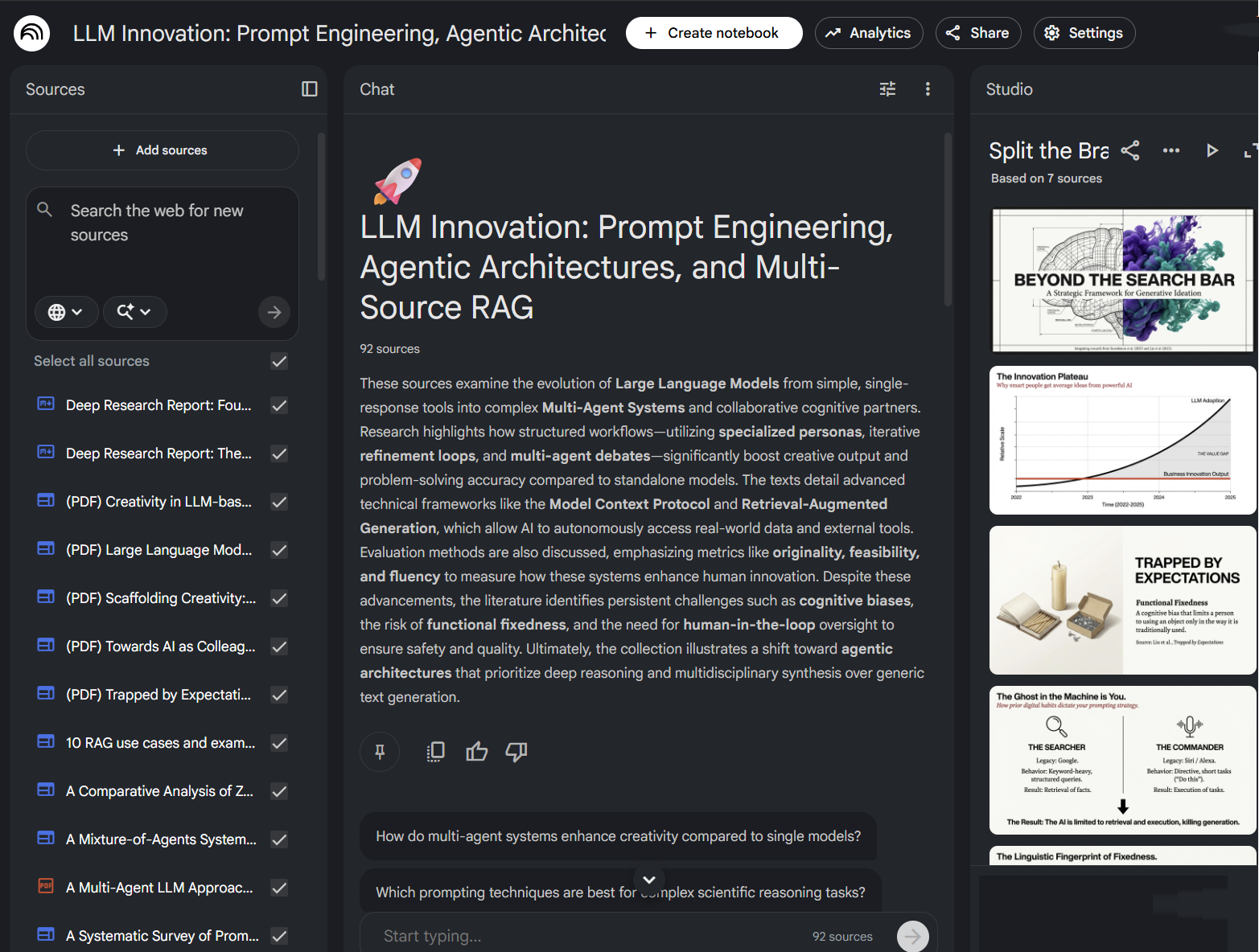
NotebookLM lets you conduct research reports and gather source documents (on the left), ask questions of the sources and material (the middle) and turn them into things like slide shows (on the right)

NotebookLM is Google’s answer to a different problem: how do you use AI to make sense of a lot of information? You can ask NotebookLM to do its own deep research, or else add in your own papers, YouTube videos, websites, or files, and NotebookLM builds an interactive knowledge base you can query, turn into slides, mind maps, videos and, most famously, AI-generated podcasts where two hosts discuss your material (you can even interrupt the hosts to ask questions). If you are a student, a researcher, or anyone who regularly needs to make sense of a pile of documents, NotebookLM is a very useful tool..

And then there is OpenClaw, which I want to mention even though it doesn’t fit neatly into any of these categories and which you almost definitely shouldn’t use. OpenClaw is an open-source AI agent that went viral in late January. It runs locally on your computer, connects to whatever AI model you want, and you talk to it like you were chatting with a person using standard chats like WhatsApp or iMessage. It can browse the web, manage your files, send emails, and run commands. It is sort of a 24/7 personal assistant that lives on your machine. It is also a serious security risk: you are giving an AI broad access to your computer and your accounts, and no one knows exactly what dangers you are exposing yourself to. But it does serve as a sign of where things are going.

What to do now

I know this is a lot. Let me simplify.

If you are just getting started, pick one of the three systems (ChatGPT, Claude, or Gemini), pay the $20, and select the advanced model. The advice from my book still holds: invite AI to everything you do. Start using it for real work. Upload a document you’re actually working on. Give the AI a very complex task in the form of an RFP or SOP. Have a back-and-forth conversation and push it. This alone will teach you more than any guide.

If you are already comfortable with chatbots, try the specific apps. NotebookLM is free and easy to use, which makes it a good starting place. If you want to go deeper, Anthropic offers the most powerful package in Claude Code, Claude Cowork (both accessible through Claude Desktop) as well as the specialized PowerPoint and Excel Plugins. Give them a try. Again, not as a demo, but with something you actually need done. Watch what it does. Steer it when it goes wrong. You aren’t prompting, you are (as I wrote in my last piece) managing.

The shift from chatbot to agent is the most important change in how people use AI since ChatGPT launched. It is still early, and these tools are still hard to figure out and will still do baffling things. But an AI that does things is fundamentally more useful than an AI that says things, and learning to use it that way is worth your time.

Subscribe now

Share

Read the whole story
peior
8 days ago
reply
Share this story
Delete

Process thinking

1 Share

Sure, you made it work this time, but will it work next time?

Can you teach the method to someone else?

Do you have a protocol for what to do when it doesn’t work?

How can someone else contribute to your process to make it better?

      
Read the whole story
peior
9 days ago
reply
Share this story
Delete

AI Guardrails Do Not Work (Yet)

1 Share

Would you cross a bridge that was 99.7% safe? The answer is not necessarily simple. It depends on how many times you need to cross it (once, or every day for work), what happens if you fall (ankle sprain, or certain death), what happens if you do not cross it (mild inconvenience, or being chased by a tiger), and whether there is any alternative.

AI agent security faces the same question: what level of risk is acceptable, and who gets to decide?

There are two schools of thought, and they lead to very different conclusions about what we should build.

The Deterministic School

The first school says we must solve this problem deterministically. Simon Willison has been documenting the prompt injection problem for years1, and his conclusion remains sobering: we have known about this issue for more than two and a half years and we still do not have convincing mitigations. Models have no ability to reliably distinguish between instructions and data. Any content they process can be interpreted as an instruction.

Google’s CaMeL framework takes this seriously.2 It separates control flow from data flow, then enforces what may pass into each tool at execution time. A Privileged LLM sees only the trusted user request and writes the plan as code without ever seeing untrusted data. A Quarantined LLM parses untrusted content into structured fields and cannot call tools. Injected text cannot hijack tool execution directly.

Tested on AgentDojo, a benchmark of real-world agent tasks like managing emails and booking travel, CaMeL solved 77% of tasks with provable security, compared to 84% for an agent with no security at all. That is a big step forward. But that headline gap of seven percentage points hides the real cost: in complex task domains the drop is far steeper. The architectural constraints that provide security limit the autonomy users demand.

I explored this tension when analysing browser agents. The only reliable approach requires architectural boundaries that make certain attacks impossible rather than merely detectable. Do not tell the agent what not to do. Only give it options it can safely choose from. Make failure architecturally impossible. But an agent that can only choose from pre-approved options cannot handle novel situations. This is one reason why 95% of teams cannot ship their agents to production.

The Error Tolerance School

The second school says we must accept an error tolerance as a tradeoff. This is how we think about self-driving cars. Waymo reports more than a ten-fold reduction in crashes with serious injuries compared to human drivers.3 But it does not matter that they are ten times as safe. What matters is human perception, and we still have work to do convincing people that autonomous vehicles are safe despite what the stats say. We are in exactly the same place with AI agents.

The same logic applies. Humans fall for social engineering attacks constantly. Phishing works. If an AI agent falls for fewer attacks than a human assistant would, perhaps that is good enough. We do not demand perfection from human employees. We accept that people make mistakes, click wrong links, and occasionally leak sensitive information. This is the only way tools like OpenClaw will ever be considered “safe”: when we redefine “safe” as a relative term that includes tolerances. Not safe as in “cybersecurity”, but safe as in “bridge” or “driving in traffic”. The problem, as the comic above illustrates, is knowing what level of tolerance we will accept.

OpenAI has started framing prompt injection this way.4 Some critics say this downplays a technical flaw. But it also acknowledges a truth: we have been living with imperfect human security forever.

The Problem With Error Tolerance Today

The challenge is that red team researchers report it is still trivially easy to break through guardrails. Sander Schulhoff put it bluntly: bypassing guardrails is so easy that most people should not bother with them.5 A joint paper tested published defences against prompt injection with adaptive attacks and achieved above 90% attack success rate for most of them.6

This is not a matter of needing slightly better guardrails. The current approaches do not work. Attackers hide malicious instructions in images. They use social engineering techniques adapted from human manipulation. They chain together innocuous-seeming requests that combine into malicious actions. They use languages underrepresented in training data to bypass alignment mechanisms.

Security researcher Johann Rehberger tested Devin AI’s security and found it completely defenceless against prompt injection.7 All major providers have added guardrails, but none of them work against a determined attacker. I wrote about why independent coding agents are not ready partly because of these security gaps.

This is why I keep saying that error tolerance is not yet viable. The error rate is too high. When 90% of adaptive attacks succeed, you have no defence at all.

But Models Are Getting Better

Each new model generation shows dramatic improvement. On Gray Swan’s benchmark8, Opus 4.5 achieved a 4.7% attack success rate, compared to 12.6% for GPT-5.1 Thinking and 12.5% for Gemini 3 Pro. Anthropic’s own testing showed only 1.4% of prompt injection attacks succeeded against Opus 4.5, down from 10.8% for previous models with older safeguards.9 For computer use specifically, Opus 4.5 with extended thinking fully saturated Gray Swan’s benchmark, and even with 200 attempts most attackers failed to find a successful attack.

Today Anthropic released Opus 4.6, which they describe as having a safety profile “as good as, or better than, any other frontier model in the industry” with enhanced cybersecurity abilities and the lowest rate of over-refusals of any recent Claude model.10 The trend line is clear: each generation gets harder to attack.

This suggests the error tolerance school might eventually be right, even if it is wrong today. If models continue improving at this rate, we might reach a point where the residual attack success rate is low enough to accept as a tradeoff for usefulness. We do not demand that human assistants be immune to social engineering. If AI agents become more resistant than humans, perhaps that is sufficient.

What This Means For Practitioners

If you are building agent systems today, the numbers do not support relying on error tolerance. Use deterministic approaches where possible: constrain the action space, separate control and data flow, enforce policies at execution time, and accept the capability cost that comes with them. If you are building with agent loops, keep the tool set minimal and the permissions tight.

But watch the benchmarks, because if prompt injection resistance continues improving, the calculus changes. A system with a 1% attack success rate faces very different risk tradeoffs than one with 90%, and the architectural constraints that feel necessary today might become optional overhead tomorrow. Early autonomous vehicles could only work in specific cities with detailed maps in good weather, but as the technology improved those constraints relaxed. The same pattern might apply to AI agents.

For now, I remain in the deterministic school because the error rates are too high and the attacks too easy. I uninstalled OpenClaw for exactly this reason. But I am watching each new model’s benchmark results closely, and if the next generation cuts attack success rates by another order of magnitude, error tolerance starts looking viable. Guardrails do not work today, and whether they work tomorrow depends on whether model capability improvements outpace attacker sophistication.

Thanks to Ville Hellman and Dave Cunningham for conversations that shaped this post.

  1. Simon Willison has been the most consistent voice documenting prompt injection risks. His November 2025 post reviews key research papers including “Agents Rule of Two” from Meta and the adaptive attacks paper from OpenAI, Anthropic, and Google DeepMind. 

  2. Google’s CaMeL (Capabilities for Machine Learning) framework is explained in detail in Willison’s analysis. The key insight is separating the LLM that plans from the LLM that processes untrusted data. 

  3. Waymo published their safety data in December 2025, showing significant reductions in serious injury crashes compared to human drivers across their operational domains. 

  4. OpenAI’s Atlas browser announcement explicitly compares prompt injection to online fraud, framing it as an ongoing arms race rather than a solvable technical problem. 

  5. Sander Schulhoff discussed AI security on Lenny’s Podcast. Schulhoff runs HackAPrompt, the largest AI red teaming competition, in partnership with OpenAI. 

  6. The adaptive attacks paper tested 12 published defences and achieved above 90% attack success rates against most of them by tuning general optimisation techniques. The research included authors from OpenAI, Anthropic, and Google DeepMind. 

  7. Johann Rehberger spent $500 on Devin AI security testing and found the agent could be manipulated to expose ports, leak access tokens, and install command-and-control malware. 

  8. Gray Swan’s independent benchmark for prompt injection resistance. See Zvi’s analysis of Opus 4.5’s performance, which shows a significant gap between Anthropic’s model and competitors. 

  9. Anthropic’s model card for Opus 4.5 includes detailed safety evaluations including prompt injection resistance metrics. 

  10. Anthropic’s Opus 4.6 announcement describes the model’s safety profile and enhanced cybersecurity abilities. The system card includes their most comprehensive set of safety evaluations to date. 

Read the whole story
peior
21 days ago
reply
Share this story
Delete

AI Must Be Line Managed

1 Share

I used to just code. Then I managed teams. Now I find myself needing management skills again, even when I am not managing people.

The first time I tried delegating to an AI agent, it felt exactly like onboarding a new team member. I was not sure what to hand over or how to check the work. It took a lot longer than doing it myself. But there is real leverage on the other side. This is how I found it.

A New Mental Model

AI agents are not people to manage and they are not programs to command. They are something new entirely, and that requires a new mental model. I wrote previously about how engineering managers are often well-suited for AI work because they already think in terms of delegation and non-determinism. But even they have to unlearn old habits.

Chat vs Agents

Before going further, a distinction matters here. Chat interfaces like ChatGPT or Claude.ai are for quick questions. Agents have agency: they can plan, execute, and adapt.

Agents work with multi-file context, multi-step reasoning, and persistent context across sessions. Chat just responds to what you type. The shift is from “AI assistant” to “AI thought partner.” For delegation to work, you need the repository approach, not chatbots.

Tools like Claude Code and Cursor are platforms, not just interfaces. Through MCP (Model Context Protocol) and tool chaining, you can build an extensible delegation infrastructure. Your CLAUDE.md file becomes a training document for your AI staff. You are building a system that compounds, not just delegating individual tasks.

I have written more about how to use Claude Code skills to encode your work patterns into reusable prompts. This turns one-off delegation into repeatable systems.

When and How to Delegate

Choosing Your Delegation Level for AI - table showing five levels from Fire and Forget to Human-Led with AI Boost

Not every task should go to AI. AI reaches consistency quickly through prompting, but competence slowly through model improvements. Humans reach competence quickly but consistency slowly.

Deploy AI where uniform mediocrity beats variable excellence: expense categorisation, first-pass code reviews, interview scoring against rubrics. These are tasks where consistency matters more than occasional brilliance, and where human variability causes problems. This reframes the “80% as well as you” concern. It is a strategic advantage, not a compromise.

Once you decide to delegate, the next question is how hands-on to be. Shreyas Doshi’s radical delegation framework offers a useful lens: consider both the stakes of the outcome and the capability of the person (or in our case, the AI) handling it.1

Two questions determine your delegation level. How much does outcome quality matter? A draft email to a colleague has different stakes than a client proposal. And how capable is AI at this task? Some tasks AI handles well today, others require significant human judgment. This changes as models improve, so revisit your assumptions regularly.

These two factors create a spectrum of involvement:

Fire and forget. Low stakes, AI is capable. You set it up once and let it run. Email triage rules, calendar scheduling, routine data formatting. Check occasionally to make sure nothing has drifted.

Spot check. Medium stakes, AI is mostly capable. You review outputs periodically but do not approve each one. Internal summaries, first-draft documentation, research compilation.

Approve before action. Higher stakes or lower AI capability. AI drafts, you review and approve before anything goes out. Client communications, code merges, published content.

Collaborative. High stakes, complex judgment required. You work together in real-time, AI assists your thinking rather than replacing it. Strategy documents, architectural decisions, sensitive communications.

Human-led with AI boost. Critical outcomes, novel situations, high judgment. You lead the work entirely, AI helps with research, drafting, or analysis. Contract negotiations, hiring decisions, crisis response.

One factor people forget: AI can be phished. Prompt injection attacks can manipulate agents into leaking data or taking unintended actions. The more autonomous the delegation level, the more you need guardrails and monitoring in place.

Be Careful

The Clawdbot Effect - comic showing CEO firing EA for 80% accuracy on Monday, then installing Clawdbot at 3am Tuesday

This matters more as always-on agents become common. Moltbot (formerly Clawdbot) has taken X by storm recently,2 an always-on agent that can work autonomously on tasks over hours or days. The temptation is obvious: fire the assistant who keeps getting things 80% right and install Clawdbot to save money. But if you would not trust a human with a task unsupervised, you should not trust an AI with it either. The same delegation principles apply. When AI can act without you in the loop, being intentional about what you delegate becomes critical. Choose your delegation level deliberately, not by default. I wrote more about this in my week with Clawdbot.

Where you draw the line depends on task-relevant maturity. As AI improves at a task (or as you build better prompts and guardrails), you can move down the spectrum. What starts as “approve before action” might become “spot check” after a few months of reliable performance.

How to Delegate a Workflow

The flowchart above walks through my decision process for whether to automate a task at all. Once you have decided to delegate, here is how to actually do it.

Pick Something That Fits

Find a task that passes the flowchart test: takes meaningful time, drains your energy or you hate doing it, and would not require endless tweaking to get right. Start there.

The bitter lesson applies here: try the simplest approach first. What once required elaborate automation pipelines in n8n or Zapier now often works with a simple prompt and a CLAUDE.md file that knows your preferences. Ask Claude Code to do it directly before reaching for workflow tools.

Find the Decision Point

Look for the moment in the task where judgment happens. Where you would not normally give the job to a computer. Try to find a really simple decision that you make all the time.

If you are not sure what an AI might be able to do, ask an AI agent to brainstorm where an agent could help within your workflow. This kind of meta-thinking about strategy is a really important skill to develop.

Automate and Iterate

Pick that decision point and automate it. Test, iterate, and refine.

Each experiment will teach you something new about what AI can do, slowly increasing your leverage over time. If something does not work, revisit when a new model comes out. The tech is moving so fast that what did not work three months ago might just work now.

Real Examples

I started with email triage. Imagine you receive inbound emails asking for advice. You probably already automate parts of this process using rules, marking particular emails as important based on who they are from. Try first to move this process to a workflow tool.

Once that is done, how do you process the rest? Normally, you might read each one and decide: should you reply personally, refer the person to a resource, or have AI draft a first response? Set up a workflow where AI reviews the email and drafts a reply for you to approve, or marks the email as important for your attention. You can start by automating the triage step, then gradually hand over more of the process as you gain confidence.

But that was just the beginning. I now have Claude Code skills that handle my daily workflow: processing my inbox of captured thoughts into proper notes and tasks, generating end-of-day summaries with timeline visualisations, creating blog posts with infographics, managing webinar content. Each one started as a single decision point I kept making manually. Now I invoke a skill and the decision is handled.

Surviving the 80% Trap

Most people hit 70-80% quality on their first delegation attempt, realise that is not good enough, and have to reverse-engineer everything to start over. This is the process, not failure. The 80% trap catches almost everyone. Knowing it is coming makes it easier to push through.

The journey to effective AI delegation is not linear. Each round improves your ability to specify requirements and spot problems. Big Design Up Front does not work here. You cannot write a detailed spec and parallelise the work like a traditional software project. Instead, start from use cases and pull through functionality. Let the agent reveal what is needed through iteration.

Approach AI delegation like hiring contractors: experiment quickly and move on if something is not working. Do not get stuck trying to make a suboptimal approach work. The goal is to find what works for you.

The path to effective AI delegation is not smooth. It is fiddly and sometimes frustrating. But every experiment brings you closer to real leverage. The mess is part of the process.

Build Infrastructure, Not Tasks

The contractor metaphor has limits. You are building a delegation system, not just hiring a contractor.

Your CLAUDE.md file and your skills are your operations manual for the AI team. They encode how you work, what you expect, and how decisions should be made. Every time you refine them, you are training your infrastructure to work better without you. Share them with others. Unlike tribal knowledge locked in someone’s head, these are portable, forkable, improvable. I have written about how simple orchestration patterns beat clever engineering. A bash loop calling an agent repeatedly outperforms elaborate multi-agent architectures.

One pattern I am exploring: using task managers like Reclaim as a queue, with Claude Code as the executor. When you start a Reclaim task, the agent spins up with context. You are delegating your task system, not individual tasks.

The Payoff

The awkwardness is a sign you are learning and making progress. If we learn to delegate and let go of our perfectionism, real leverage opens up for us. The beauty of the AI age is that this leverage is beginning to be available to all, not just high-performing leaders. We need to learn the skills they use to realise the same benefits.

Every experiment brings you closer to the kind of leverage that transforms your workflow. You do not need a perfect system. You just need to start.

  1. Shreyas Doshi’s radical delegation framework considers both impact to the business and the person’s confidence level to determine how hands-on a leader should be. The higher the stakes and lower the confidence, the more closely you need to be involved. See his original thread for more. 

  2. See the Moltbot GitHub repository. There has been a wave of YouTube videos hyping Moltbot as a must-have tool, but be careful: installing an always-on agent with access to your machine and accounts is dangerous if you do not understand what you are doing. 

Read the whole story
peior
27 days ago
reply
Share this story
Delete

A field guide to sandboxes for AI

1 Share
Dunes in Oman

Photo by Christian Weiss


Every AI agent eventually asks for the same thing:

Let me run a program.

Sometimes it’s a harmless pytest. Sometimes it’s pip install sketchy-package && python run.py. Either way, the moment you let an agent execute code, you’re running untrusted bytes on a machine you care about.

Years ago I first learned this lesson doing basic malware analysis. The mental model was blunt but effective: run hostile code in something you can delete. If it breaks out, you nuke it.

AI agents recreate the same problem, except now the “malware sample” is often:

  • code generated by a model,
  • code pasted in by a user,
  • or a dependency chain your agent pulled in because it “looked right.”

In all cases, the code becomes a kernel client. It gets whatever the kernel and policy allow: filesystem reads, network access, CPU time, memory, process creation, and sometimes GPUs.

And “escape” isn’t the only failure mode. Even without a kernel exploit, untrusted code can:

  • exfiltrate secrets (SSH keys, cloud creds, API tokens),
  • phone home with private repo code,
  • pivot into internal networks,
  • or just burn your money (crypto mining, fork bombs, runaway builds).

The request is simple: run this program, don’t let it become a machine-ownership problem.

This isn’t niche anymore. Vercel, Cloudflare, and Google have all shipped sandboxed execution products in the last year. But the underlying technology choices are still misunderstood, which leads to “sandboxes” that are either weaker than expected or more expensive than necessary.

Part of the confusion is that AI execution comes in multiple shapes:

  • Remote devbox / coding agent: long-lived workspace, shell access, package managers, sometimes GPU.
  • Stateless code interpreter: run a snippet, return output, discard state.
  • Tool calling: run small components (e.g., “read this file”, “call this API”) with explicit capabilities.
  • RL environments: lots of parallel runs, fast reset, sometimes snapshot/restore.

Different shapes want different lifecycle and different boundaries.

There’s also a hardware story hiding here. In 2010, “just use a VM” usually meant seconds of boot time and enough overhead to kill density. Containers won because they were cheap.

In 2026, you can boot a microVM fast enough to feel container-like, and you can snapshot/restore them to make “reset” almost free. The trade space changed, but our vocabulary didn’t.

The other part of the confusion is the word sandbox itself. In practice, people use it to mean at least four different boundaries:

A container shares the host kernel. Every syscall still lands in the same kernel that runs everything else. A kernel bug in any allowed syscall path is a host bug.

A microVM runs a guest kernel behind hardware virtualization. The workload talks to its kernel. The host kernel mostly sees KVM ioctls and virtio device I/O, not the full Linux syscall ABI.

gVisor interposes a userspace kernel. Application syscalls are handled by the Sentry rather than going straight to the host kernel; the Sentry itself uses a small allowlist of host syscalls.

WebAssembly / isolates constrain code inside a runtime. There is no ambient filesystem or network access; the guest only gets host capabilities you explicitly provide.

These aren’t interchangeable. They have different startup costs, compatibility stories, and failure modes. Pick the wrong one and you’ll either ship a “sandbox” that leaks, or a sandbox that can’t run the software you need.

Diagram comparing syscall paths across four sandbox boundaries: containers, gVisor, microVMs, and WebAssembly. Shows how each type mediates access to the host kernel with decreasing direct syscall ABI exposure from left to right.

How each boundary mediates access to the host kernel. Moving left → right, direct syscall ABI exposure shrinks.

The diagram is the whole game. Containers expose the host kernel’s syscall ABI (filtered by policy, but still the same kernel). gVisor interposes a userspace kernel. MicroVMs insert a guest kernel behind hardware virtualization. Wasm modules don’t get a syscall ABI at all — they get explicit host functions.

Moving left → right, direct syscall ABI exposure shrinks.

But you don’t get something for nothing. Every “stronger” boundary adds a different trusted component: a userspace kernel (gVisor), a guest kernel + VMM (microVMs), or a runtime + embedder (Wasm). Stronger doesn’t mean simpler. It means you’re betting on different code.

If this still feels weird, it’s because the industry trained us to treat containers as the default answer.

It’s the mid-2010s. Docker is exploding. Kubernetes makes containers the unit of scheduling. VMs are heavier, slower to boot, and harder to operate. Containers solve a real problem: start fast, pack densely, ship the same artifact everywhere.

For trusted workloads, that bet is often fine: you’re already trusting the host kernel.

AI agents change the threat model as now you are executing arbitrary code paths, often generated by a model, sometimes supplied by a user, inside your infrastructure.

That doesn’t mean “never use containers.” It means you need a clearer decision procedure than “whatever we already use.”

In the rest of this post, I’ll give you a simple mental model for evaluating sandboxes, then walk through the boundaries that show up in real AI execution systems: containers, gVisor, microVMs, and runtime sandboxes.


The three-question model

Here’s the mental model I use. Sandboxing is three separate decisions that people blur together, and keeping them distinct prevents a lot of bad calls.

Boundary is where isolation is enforced. It defines what sits on each side of the line.

  • Container boundary: processes in separate namespaces, still one host kernel.
  • gVisor boundary: workload syscalls are serviced by a userspace kernel (Sentry) first.
  • MicroVM boundary: syscalls go to a guest kernel; the host kernel sees hypervisor/VMM activity, not the guest syscall ABI.
  • Runtime boundary: guest code has no syscall ABI; it can only call explicit host APIs.

The boundary is the line you bet the attacker cannot cross.

Policy is what the code can touch inside the boundary:

  • filesystem paths (read/write/exec),
  • network destinations and protocols,
  • process creation/signals,
  • device access (including GPUs),
  • time/memory/CPU/disk quotas,
  • and the interface surface itself (syscalls, ioctls, imports).

A tight policy in a weak boundary is still a weak sandbox. A strong boundary with a permissive policy is a missed opportunity.

Lifecycle is what persists between runs. This matters a lot for agents and RL:

  • Fresh run: nothing persists. Great for hostile code. Bad for “agent workspace” UX.
  • Workspace: long-lived filesystem/session. Great for agents; dangerous if secrets leak or persistence is abused.
  • Snapshot/restore: fast reset by checkpointing VM or runtime state. Great for RL rollouts and “pre-warmed” agents.

Lifecycle also changes your operational choices. If you snapshot, you need a snapshotable boundary (microVMs, some runtimes). If you need a workspace, you need durable storage and a policy story for secrets.

The three questions

When evaluating any sandbox, ask:

  1. What is shared between this code and the host?
  2. What can the code touch (files, network, devices, syscalls)?
  3. What survives between runs?

If you can answer those, you understand your sandbox. If you can’t, you’re guessing.

A quick example makes the separation clearer:

  • Multi-tenant coding agent
    • Boundary: microVM (guest kernel)
    • Policy: allow workspace FS, deny host mounts, outbound allowlist, no raw devices
    • Lifecycle: snapshot base image, clone per session, destroy on close

Same product idea, different constraints:

  • Tool calling (e.g., “format this code”)
    • Boundary: Wasm component
    • Policy: preopen one directory, no network by default
    • Lifecycle: fresh per call

Vocabulary

Sandbox: boundary + policy + lifecycle.

Container: a packaging format plus process isolation built on kernel features. One kernel, many isolated views.

Virtual machine: a guest OS kernel running on virtual hardware.

MicroVM: a minimal VM optimized for fast boot and small footprint.

Runtime sandbox: isolation enforced by a runtime (Wasm, V8 isolates) rather than the OS.


Linux building blocks

Before comparing sandbox types, it helps to be explicit about what we’re sandboxing against. A process is a kernel client.

Diagram showing the anatomy of a Linux syscall: a userspace process makes a syscall request, the kernel validates and executes it, then returns the result to userspace.

It runs in userspace. When it needs something real — read a file, create a socket, allocate memory, spawn a process — it makes a syscall. That syscall enters the kernel. Kernel code runs with full privileges.

If there is a bug in any reachable syscall path, filesystem code, networking code, or ioctl handler, you can get local privilege escalation. That’s the root of the “container escape” story.

If you want a mental picture: the process is unprivileged code repeatedly asking the kernel to do work on its behalf. You can restrict which questions it’s allowed to ask. You cannot make the kernel stop being privileged.

Linux containers are a policy sandwich built from four primitives:

Namespaces

Namespaces give a process an isolated view of certain resources by providing separate instances of kernel subsystems:

  • PID namespace: isolated process tree / PID numbering
  • Mount namespace: isolated mount table / filesystem view
  • Network namespace: isolated network stack (interfaces, routes, netfilter state)
  • IPC/UTS namespaces: System V IPC isolation and hostname isolation
  • User namespace: UID/GID mappings and capability scoping

User namespaces are worth calling out. They let you map “root inside the container” to an unprivileged UID on the host. This changes the meaning of privilege. Rootless containers get a real security win here, because an accidental “root in the container” does not automatically mean “root on the host.”

But it’s still the same kernel boundary. A kernel bug is a kernel bug.

Capabilities

Linux breaks “root” into capabilities (fine-grained privileges). Containers typically start with a reduced capability set, but they often still include enough power to hurt you if you hand out the wrong ones.

The infamous one is CAP_SYS_ADMIN. It gates a huge, loosely-related collection of privileged operations, and in practice it often unlocks dangerous kernel interfaces. That’s why you’ll hear people say “SYS_ADMIN is the new root.”

In real sandboxes, treat capability grants as part of your attack surface budget. The easiest win is often just removing capabilities you don’t need.

Cgroups

Cgroups (control groups) limit and account for resources:

  • CPU quota/shares and CPU affinity sets
  • memory limits
  • I/O bandwidth / IOPS throttling
  • max process count (mitigates fork bombs)

Cgroups are primarily about preventing resource exhaustion. They don’t materially reduce kernel attack surface.

Seccomp

Seccomp is syscall filtering. A process installs a BPF program that runs on syscall entry; it can inspect the syscall number (and, in many profiles, arguments) and decide what happens: allow, deny, log, trap, kill, or notify a supervisor.

A tight seccomp profile blocks syscalls that expand kernel attack surface or enable escalation (ptrace, mount, kexec_load, bpf, perf_event_open, userfaultfd, etc). It also tends to block legacy interfaces that are hard to sandbox safely.

As a toy example, a “deny dangerous syscalls” seccomp rule often looks like:

{
  "defaultAction": "SCMP_ACT_ALLOW",
  "syscalls": [
    { "names": ["bpf", "perf_event_open", "kexec_load"], "action": "SCMP_ACT_ERRNO" }
  ]
}

In real sandboxes you also filter arguments (clone3 flags, ioctl request numbers) and you run an allowlist rather than a denylist.

There’s one more seccomp feature worth knowing because it shows up in sandboxes: seccomp user notifications (SECCOMP_RET_USER_NOTIF). Instead of simply allowing or denying, the kernel can pause a syscall and send it to a supervisor process for a decision. That lets you build “brokered syscalls” (e.g., only allow open() if the path matches a policy, or proxy network connects through a policy engine).

This is powerful, but it’s not free: brokered syscalls add latency and complexity, and your broker becomes part of the trusted computing base.

But the bottom line stays the same: the syscalls you do allow still execute in the host kernel.

How containers combine these

A “container” is just a regular process configured with a set of kernel policies plus a root filesystem:

  1. Namespaces scope/virtualize resources.
  2. Capabilities are reduced.
  3. Cgroups cap resource usage.
  4. Seccomp filters syscalls on entry.
  5. A root filesystem provides the container’s view of / (often layered via overlayfs).
  6. AppArmor/SELinux may apply additional policy.
Diagram showing Linux sandboxing building blocks: syscalls enter the host kernel, seccomp can block them before dispatch, namespaces scope what resources syscalls operate on, and cgroups enforce resource quotas.

Conceptually: syscalls enter the host kernel. Seccomp can block them before dispatch. Namespaces scope resources. Cgroups enforce quotas. But it’s still the same host kernel.

This is policy-based restriction within a shared kernel boundary. You reduce what the process can see (namespaces), cap what it can consume (cgroups), and restrict which syscalls it can invoke (seccomp). You do not insert a stronger isolation boundary.

So why do people treat containers as a security boundary? Because “isolated” gets conflated with “secure,” and because containers are operationally convenient.

But if you’re choosing a sandbox, the boundary matters more than convenience.


Where containers fail

I want to be direct: containers are not a sufficient security boundary for hostile code. They can be hardened, and that matters. But they still share the host kernel.

The failure modes I see most often are misconfiguration and kernel/runtime bugs — plus a third one that shows up in AI systems: policy leakage.

Misconfiguration escapes

Many container escapes are self-inflicted. The runtime offers ways to weaken isolation, and people use them.

--privileged removes most guardrails. It effectively turns the container into “root on the host with some extra steps.” If your sandbox needs privileged mode, you don’t have a sandbox.

The Docker socket (/var/run/docker.sock) is another classic. Mount it and you can ask the host Docker daemon to create a new privileged container, mount the host filesystem, and so on. In practice, access to the Docker socket is access to host root.

Sensitive mounts and broad capabilities are the rest of the usual list:

  • writable /sys or /proc/sys
  • host paths bind-mounted writable
  • adding broad capabilities (especially CAP_SYS_ADMIN)
  • joining host namespaces (--pid=host, --net=host)
  • device passthrough that exposes raw kernel interfaces

These are tractable problems: you can audit configs and ban obvious foot-guns.

Kernel and runtime bugs

A properly configured container still shares the host kernel. If the kernel has a bug reachable via an allowed syscall, filesystem path, network stack behavior, or ioctl, code inside the container can trigger it.

Examples of container-relevant local privilege escalations:

  • Dirty COW (CVE-2016-5195): copy-on-write race in the memory subsystem.
  • Dirty Pipe (CVE-2022-0847): pipe handling bug enabling overwriting data in read-only mappings.
  • fs_context overflow (CVE-2022-0185): filesystem context parsing bug exploited in container contexts.

Seccomp reduces exposure by blocking syscalls, but the syscalls you allow are still kernel code. Docker’s default seccomp profile is a compatibility-biased allowlist: it blocks some high-risk calls but still permits hundreds.

And it’s not only the kernel. A container runtime bug can be enough (for example, runC overwrite: CVE-2019-5736).

Policy leakage (the AI-specific one)

A lot of “agent sandbox” failures aren’t kernel escapes. They’re policy failures.

If your sandbox can read the repo and has outbound network access, the agent can leak the repo. If it can read ~/.aws or mount host volumes, it can leak credentials. If it can reach internal services, it can become a lateral-movement tool.

This is why sandbox design for agents is often more about explicit capability design than about “strongest boundary available.” Boundary matters, but policy is how you control the blast radius when the model does something dumb or malicious prompts steer it.

Two practical notes:

  • Rootless/user namespaces help. They reduce the damage from accidental privilege. They don’t make kernel bugs go away.
  • Multi-tenant changes everything. If you run code from different trust domains on the same kernel, you should assume someone will try to hit kernel bugs and side channels. “But it’s only build code” stops being a comfort.

One more container-specific gotcha: ioctl is a huge surface area. Even if you block dangerous syscalls, many real kernel interfaces live behind ioctl() on file descriptors (filesystems, devices, networking). If you pass through devices (especially GPUs), you’re exposing large driver code paths to untrusted input.

This is why many “AI sandboxes” that look like containers end up quietly adding one of the stronger boundaries underneath: either gVisor to reduce host syscalls, or microVMs to put a guest kernel in front of the host.

None of this means containers are “bad.” It means containers are a great tool when all code inside the container is in the same trust domain as the host. If you’re running your own services, that’s often true.

The moment you accept code from outside your trust boundary (users, agents, plugins), treat “shared kernel” as a conscious risk decision — not as the default.

Hardening options

Hardening tightens policy. It doesn’t change the boundary.

Hardening measureWhat it doesWhat it doesn’t do
Custom seccompblocks more syscalls/args than defaultsdoesn’t protect against bugs in allowed kernel paths
AppArmor/SELinuxconstrains filesystem/procfs and sensitive opsdoesn’t fix kernel bugs; it only reduces reachable paths
Drop capabilitiesremoves privileged interfaces (avoid SYS_ADMIN)doesn’t change shared-kernel boundary
Read-only rootfsprevents writes to container rootdoesn’t prevent in-memory/kernel exploitation
User namespacesmaps container root to unprivileged host UIDkernel bugs may still allow escalation

At the limit, you can harden a container until it’s nearly unusable. You still haven’t changed the boundary. The few syscalls you allow are still privileged kernel code. The kernel is still shared.

If a kernel exploit matters, you need a different boundary:

  • gVisor: syscall interposition
  • microVMs: guest kernel behind virtualization
  • Wasm/isolates: no syscall ABI at all

Stronger boundaries

Containers share a fundamental constraint: the workload’s syscalls go to the host kernel. To actually change the boundary, you have two main approaches:

  1. Syscall interposition: intercept syscalls before they reach the host kernel, reimplement enough of Linux in userspace
  2. Hardware virtualization: run a guest kernel behind a VMM/hypervisor, reduce host exposure to VM exits and device I/O

gVisor

gVisor is an “application kernel” that intercepts syscalls (and some faults) from a container and handles them in a userspace kernel called the Sentry.

If containers are “processes in namespaces,” gVisor is “processes in namespaces, but their syscalls don’t go straight to the host kernel.”

A few implementation details matter when you’re choosing it:

  • gVisor integrates as an OCI runtime (runsc), so it drops into Docker/Kubernetes.
  • The Sentry implements kernel logic in Go: syscalls, signals, parts of /proc, a network stack, etc.
  • Interception is done by a gVisor platform. Today the default is systrap; older deployments used ptrace, and there is optional KVM mode.

Two subsystems are worth understanding because they dominate performance and security behavior:

Filesystem mediation (Gofer / lisafs). gVisor commonly splits responsibilities: the Sentry enforces syscall semantics, but filesystem access may be mediated by a separate component that does host filesystem operations and serves them to the Sentry over a protocol (historically “Gofer”; newer work includes lisafs). This is one way gVisor keeps the Sentry’s host interface small and auditable.

Networking (netstack vs host). gVisor can use its own userspace network stack (“netstack”) and avoid interacting with the host network stack in the same way a container would. There are also modes that integrate more directly with host networking depending on deployment constraints.

The security point is that the workload no longer chooses which host syscalls to call. The Sentry does, and the Sentry itself can be constrained to a small allowlist of host syscalls. gVisor has published syscall allowlist figures: 53 host syscalls without networking, plus 15 more with networking (68 total) in one configuration, enforced with seccomp on the Sentry process.

That’s a very different interface than “whatever syscalls your container workload can make.”

The tradeoffs are predictable:

  • Compatibility: not every syscall and kernel behavior is identical. There’s a syscall compatibility table, and you will eventually hit it.
  • Overhead: syscall interposition isn’t free. Syscall-heavy workloads pay more. Filesystem-heavy workloads pay for mediation and extra copies/IPC.
  • Debuggability: failure modes include ENOSYS for unimplemented calls, or subtle semantic mismatches.

My take: gVisor fits best when you can tolerate “Linux, but with a compatibility matrix,” and you want a materially smaller host-kernel interface than a standard container.

Diagram showing gVisor architecture: the Sentry userspace kernel intercepts syscalls from the sandboxed application, handling most syscalls itself and making only a reduced set of host syscalls.

MicroVMs

The alternative to syscall interposition is hardware isolation. Run a guest kernel behind hardware virtualization (KVM on Linux, Hypervisor.framework on macOS). The host kernel sees VM exits and virtio device I/O rather than individual workload syscalls.

This is why microVMs are the default answer for “run arbitrary Linux code for strangers.” You get full Linux semantics without reimplementing the syscall ABI.

What the host kernel actually sees

A microVM still uses the host kernel, but the interface changes shape:

  • VMM makes /dev/kvm ioctls to create vCPUs, map guest memory, and run the VM.
  • Guest interacts with virtual devices (virtio-net, virtio-blk, vsock). Those devices are implemented by the VMM (or by backends like vhost-user).
  • Execution triggers VM exits (traps to the host) on privileged events, device I/O, interrupts, etc.

The host kernel still mediates access, but through a narrower, more structured interface than the full Linux syscall ABI.

What microVMs don’t solve by themselves

A guest kernel boundary doesn’t automatically mean “safe.”

You still need to decide policy:

  • Does the guest have outbound network access?
  • Does it mount secrets or credentials?
  • Does it have access to internal services?
  • Does it share any filesystem state between runs?

A microVM is a strong boundary, but you still need a strong policy to avoid turning it into a high-powered data exfiltration box.

At scale, microVM-based sandboxes converge on a small set of lifecycle patterns:

  • Ephemeral session VM: boot → run commands → destroy. Simple and dependable.
  • Snapshot cloning: boot a “golden” VM once (language runtimes, package cache) → snapshot → clone per session. Fast cold start and fast reset.
  • Fork-and-exec style: keep a pool of paused/suspended VMs, resume on demand. Operationally trickier but can reduce tail latency.

State injection is also a design choice, not a given:

  • Block device images (ext4 inside a virtio-blk): simple, portable, snapshot-friendly.
  • virtio-fs / 9p-like shares: share a host directory into the guest (useful for “workspace mirrors,” but it reintroduces host FS as part of the policy surface).
  • Network fetch: pull code into the guest from an object store/Git remote. Keeps host FS out of the guest boundary, but requires network policy.

And you still need a network story. Common patterns:

  • NAT + egress allowlist: most common for SaaS agents.
  • No direct internet: force all traffic through a proxy that enforces policy and logs.
  • Dedicated VPC/subnet: isolate “untrusted execution” away from internal services.

Finally, if you care about protecting the guest from the host (e.g., “users don’t trust the operator”), look at confidential computing (SEV-SNP/TDX) and projects like Confidential Containers. That’s a different threat model, but it’s increasingly relevant for hosted agent execution.

What is a VMM?

On Linux, “VM” is two layers:

  • KVM (in kernel): turns Linux into a hypervisor and exposes virtualization primitives via /dev/kvm ioctls.
  • VMM (userspace): allocates guest memory, configures vCPUs, and provides the virtual devices the guest uses.

QEMU is the classic general-purpose VMM: tons of devices, tons of legacy paths, tons of code. That flexibility is useful — and it’s also an attack surface and an ops cost.

MicroVM VMMs cut that down on purpose: fewer devices, fewer emulation paths, smaller footprint, faster boot.

The device model is the new interface

Moving from “container syscalls” to “microVM” shifts attack surface rather than eliminating it.

Instead of worrying about every syscall handler in the host kernel, you worry about:

  • KVM ioctl handling in the host kernel,
  • the VMM process (its parsing of device config, its event loops),
  • and the virtual device implementations (virtio-net, virtio-blk, virtio-fs, vsock).

This is why microVM VMMs are aggressive about minimal devices. Every device you add is more parsing, more state machines, more edge cases.

It also changes your patching responsibility. With microVMs, you now have two kernels to keep healthy:

  • the host kernel (KVM and related subsystems),
  • and the guest kernel (what your untrusted code actually attacks first).

The guest kernel can be slimmer than a general distro kernel: disable modules you don’t need, remove filesystems you don’t mount, avoid exotic drivers. This doesn’t replace patching, but it shrinks reachable code.

Virtio, but which flavor?

Virtio devices can be exposed via different transports. Firecracker uses virtio-mmio (simple, minimal) while other VMMs commonly use virtio-pci (more “normal VM” shaped, broader device ecosystem). You usually don’t care until you do: some guest tooling assumes PCI, some performance features assume a certain stack, and passthrough work tends to be PCI-centric.

“MicroVM” describes a design stance: remove legacy devices and keep the device model small.

Side-by-side comparison: container syscalls go to the shared host kernel; microVM syscalls go to a guest kernel, while the host sees KVM ioctls and virtio device I/O.

Firecracker

Firecracker is AWS’s minimalist VMM for multi-tenant serverless (Lambda, Fargate). It’s purpose-built for running lots of small VMs with tight host confinement.

The architecture is intentionally boring:

  • one Firecracker process per microVM,
  • minimal virtio device model (net, block, vsock, console),
  • and a “jailer” that sets up isolation for the VMM process before the guest ever runs.

Internally you can think of three thread types:

  • an API thread (control plane),
  • a VMM thread (device model and I/O),
  • vCPU threads (running the KVM loop).

The security story is defense in depth around the VMM:

  1. The jailer sets up chroot + namespaces + cgroups, drops privileges, then execs the VMM.
  2. A tight seccomp profile constrains the VMM. The Firecracker NSDI paper describes a whitelist of 24 syscalls (with argument filtering) and 30 ioctls.

A Firecracker microVM is configured with a small API surface (REST API or socket). Typical “remote devbox” products build higher-level lifecycle around that API: boot, snapshot, restore, pause, resume, collect logs.

Example: the VMM doesn’t “mount your repo.” You decide how to inject state: attach a block device, mount a virtio-fs share, or pull code via network inside the guest. Those choices are policy choices.

Snapshot/restore is a practical win for agents and RL:

  • Agents: you can pre-warm a base image (language runtimes, package cache) and clone quickly.
  • RL: you can reset to a known state without replaying a long initialization sequence.

Firecracker supports snapshots, but snapshot performance and correctness are workload-sensitive (memory size, device state, entropy sources). Treat it as “works well for many cases,” not “free.”

A few pragmatic limitations to keep in mind:

  • Firecracker focuses on modern Linux guests. It intentionally avoids a lot of “PC compatibility” hardware.
  • The device set is minimal by design. If your workload depends on obscure devices or kernel modules, you’ll either adapt the guest or choose a different VMM.
  • Debugging looks more like “debug a tiny VM” than “debug a container.” You’ll want good serial console logs and metrics from the VMM.

And a nuance that matters: “125ms boot” is usually the VMM and guest boot path. If you’re launching Firecracker via a heavier control plane (containerd, network setup, storage orchestration), end-to-end cold start can be higher. Measure in your stack.

Firecracker architecture diagram: single-process VMM with virtio devices; a jailer sets up chroot/namespaces/privilege dropping and applies seccomp-bpf.

cloud-hypervisor

cloud-hypervisor is also a Rust VMM, built from the same rust-vmm ecosystem, but it targets a broader class of “modern cloud VM” use cases.

The delta vs Firecracker is features and device model:

  • PCI-based virtio devices (no virtio-mmio)
  • CPU/memory/device hotplug
  • optional vhost-user backends (move device backends out-of-process)
  • VFIO passthrough (including GPUs, with the usual IOMMU/VFIO constraints)
  • Windows guest support

If you need “VM boundary and GPU passthrough,” this is a common landing spot. The project advertises boot-to-userspace under 100ms with direct kernel boot.

A caution on GPU passthrough: VFIO gives the guest much more direct access to hardware. That can be necessary and still safe, but it changes the failure modes. You now care about device firmware, IOMMU isolation, and hypervisor configuration in ways you don’t in “CPU-only microVM” designs. Many systems choose a hybrid: CPU-only microVMs for general code execution and a separate GPU service boundary for model execution.

libkrun

libkrun takes a different approach: it’s a minimal VMM embedded as a library with a C API. It uses KVM on Linux and Hypervisor.framework on macOS/ARM64.

This shows up in “run containers inside lightweight VMs on my laptop” tooling, and it’s relevant because local agents are increasingly a first-class workflow. libkrun also has an interesting macOS angle: virtio-gpu + Mesa Venus to forward Vulkan calls on Apple Silicon (Vulkan→MoltenVK→Metal). In many setups, this is how some container stacks get GPU acceleration on macOS without “full fat” VM managers.

The catch is that the trust boundary can be different. With an embedded VMM, you need to treat the VMM process itself as part of your TCB and sandbox it like any other privileged helper.

MicroVM options at a glance

VMMBest atNot great at
Firecrackermulti-tenant density, tight host confinement, snapshotsgeneral VM features, GPU passthrough
cloud-hypervisorbroader VM feature set; VFIO/hotplug; Windows supportsmallest possible surface area
libkrunlightweight VMs on dev machines (especially macOS/ARM64)large-scale multi-tenant control planes

gVisor vs microVMs

If you’re choosing between “syscall interposition” and “hardware virtualization,” the practical tradeoffs are:

  • Compatibility: microVMs are full Linux; gVisor is “mostly Linux” and you need to validate.
  • Overhead: gVisor avoids running a guest kernel; microVMs pay for a guest kernel and VMM (but can still be fast).
  • Attack surface: gVisor bets on a userspace kernel implementation and a small host syscall allowlist; microVMs bet on KVM + VMM device surface.

There isn’t a universal winner. The threat model and workload profile usually decide.


Kata Containers

Kata solves a common operational constraint: “I want to keep my container workflow, but I need VM-grade isolation.”

Kata Containers is an OCI-compatible runtime that runs containers inside a lightweight sandbox VM (often at the pod boundary in Kubernetes: multiple containers in a pod share one VM).

The architecture in one paragraph:

  • containerd/CRI creates a pod sandbox using a Kata runtime shim,
  • the shim launches a lightweight VM using a configured hypervisor backend (QEMU, Firecracker, cloud-hypervisor, etc),
  • a kata-agent inside the guest launches and manages the container processes,
  • the rootfs is shared into the guest (commonly via virtio-fs),
  • networking and vsock are provided via virtio devices.

The appeal is container ergonomics with a guest-kernel boundary. The cost is overhead: each sandbox VM carries a guest kernel plus VMM/device mediation, and boot adds latency.

Kata makes sense when you’re running mixed-trust workloads on the same Kubernetes cluster and you want a VM boundary without rewriting your platform.

Operationally, Kata is usually introduced via Kubernetes RuntimeClass: some pods use the default runc container runtime; untrusted pods use the Kata runtime class. That lets you mix trusted and untrusted workloads without standing up a separate cluster.

If you’re exploring confidential computing, Kata is also one of the common integration points for Confidential Containers (hardware-backed isolation like SEV-SNP/TDX). That’s not required for “sandbox hostile code,” but it is relevant if you need tenant isolation and stronger guarantees against the infrastructure operator.


Runtime sandboxes

Now for something genuinely different. Containers, gVisor, and microVMs all run “code as a process,” so the guest sees some syscall ABI (host kernel, userspace kernel, or guest kernel).

Runtime sandboxes flip that model. The boundary lives inside the runtime itself. The sandboxed code never gets the host’s syscall ABI. It only gets whatever the runtime (and embedder) explicitly provides.

Runtime sandbox boundary: the sandboxed code has no ambient OS access. Filesystem, network, clocks, and other effects are mediated by explicit host APIs (imports) and can be denied by default.

WebAssembly

WebAssembly is a bytecode sandbox with a clean capability story. Modules can’t touch the outside world unless the host exposes imports.

That’s a fundamentally different default from “here’s a POSIX process, please behave.”

Wasm runtimes enforce:

  • memory isolation: modules operate within a linear memory; out-of-bounds reads/writes trap.
  • constrained control flow: no arbitrary jumps to raw addresses.
  • no ambient OS access: host calls are explicit imports.

WASI (WebAssembly System Interface) extends this with a capability-oriented API. The signature move is preopened directories: instead of letting the module open arbitrary paths, you hand it a directory handle that represents “this subtree,” and it can only resolve relative paths inside it.

Here’s what that feels like in practice (pseudocode-ish):

// Give the module a view of ./workspace, not the host filesystem.
wasi.preopenDir("./workspace", "/work");

// Allow outbound HTTPS to a specific host.
wasi.allowNet(["api.github.com:443"]);

If you never preopen ~/.ssh, the module can’t read it. There’s no “oops, I forgot to check a path prefix” bug in your app that accidentally grants access, because the capability was never granted.

Performance is often excellent because there’s no guest OS to boot. Instance/module instantiation can be microseconds to milliseconds depending on runtime and compilation mode (AOT vs JIT). That’s why edge platforms like Wasm and isolates: high density, low cold start.

One detail that matters in real sandboxes: resource accounting. A runtime sandbox won’t magically stop infinite loops or exponential algorithms. You still need CPU/time limits. Many runtimes provide “fuel” or instruction metering (e.g., Wasmtime fuel) so you can preempt runaway execution deterministically.

The limitations often show up as “I need one more host function”:

  • The real security boundary is your import surface. If you expose a powerful runCommand() host call, you reinvented a shell.
  • Keep imports narrow and typed. Prefer structured operations (“read file X from preopened dir”) over generic ones (“open arbitrary path”).

One reason Wasm keeps showing up in agent tooling is the component model direction: instead of “here’s a module, call exported functions,” you get typed interfaces and better composition. That pushes you toward smaller tools with explicit inputs/outputs — which is exactly what you want for capability-scoped AI tools.

The flip side is that your host still has to be careful. The easiest way to ruin a clean Wasm sandbox is to expose one overly-powerful host function. Capability systems fail by accidental ambient authority.

Practical constraints to consider:

  • Threads exist, but support varies by runtime and platform.
  • WASI networking has been in flux (Preview 1 vs Preview 2; ecosystem catching up).
  • Dynamic languages usually require interpreters (Pyodide, etc).
  • Anything that expects “normal Linux” (shells, package managers, arbitrary binaries) doesn’t port cleanly.

Major runtimes, if you’re evaluating:

  • Wasmtime (Bytecode Alliance): security-focused, close to WASI/component-model work.
  • Wasmer: runtime plus tooling ecosystem, with WASIX for more POSIX-like APIs.
  • WasmEdge: edge/cloud-native focus.

V8 isolates (and deny-by-default runtimes)

V8 isolates are isolated instances of the V8 JavaScript engine within a process. Platforms like Cloudflare Workers use isolates to run many tenants at high density, with low startup overhead.

The isolation boundary here is the runtime: separate heaps and globals per isolate, with controlled ways to share or communicate.

Production systems still layer OS-level defenses for defense in depth (namespaces/seccomp around the runtime process, broker processes for I/O, mitigations for timing side channels). The runtime boundary is powerful, but it’s not a replacement for OS isolation if your threat model includes engine escapes.

Deno’s permission model is the same pattern exposed to developers: V8 plus a deny-by-default capability model (--allow-read, --allow-net, --allow-run).

The limitation is scope: isolates are for JS/TS (and embedded Wasm). If your sandbox needs arbitrary ELF binaries, this isn’t the tool.

Who uses runtime sandboxes for AI?

The pattern that keeps showing up is Wasm for tool isolation, not “Wasm as a whole dev environment”:

  • Microsoft Wassette: runs Wasm Components via MCP with a deny-by-default permission model.
  • NVIDIA: describes using Pyodide (CPython-in-Wasm) to run LLM-generated Python client-side inside the browser sandbox.
  • Extism: a Wasm plugin framework that’s basically “capability-scoped untrusted code execution.”

When runtime sandboxes are enough

Runtime sandboxes fit a specific profile:

ConstraintRuntime sandbox strength
Stateless executionexcellent
Cold start / densityexcellent
Full Linux compatibilityno (explicit host APIs only)
Language flexibilitylimited (Wasm languages / JS)
GPU accessonly via host-provided APIs (e.g., WebGPU), not raw devices

If the product needs a full userspace and arbitrary binaries, you’ll end up back at microVMs or gVisor. If the product is “run small tools safely,” runtime sandboxes can be the cleanest option.


Choosing a sandbox

Most selection mistakes come from skipping the boundary question and jumping straight to implementation details.

Here’s how I actually decide:

  1. Threat model: is this code trusted, semi-trusted, or hostile? Does a kernel exploit matter?
  2. Compatibility: do you need full Linux semantics, or can you live inside a capability API?
  3. Lifecycle: do you need fast reset/snapshots, or long-lived workspaces?
  4. Operations: can you run KVM and manage guest kernels, or are you constrained to containers?

A decision table:

WorkloadThreat modelCompatibility needsRecommended boundary
AI coding agent (multi-tenant SaaS)hostile (user-submitted code)full Linux, shell, package managersmicroVM (Firecracker / cloud-hypervisor)
AI coding agent (single-tenant / self-hosted)semi-trustedfull Linuxhardened container or gVisor
RL rollouts (parallel, lots of resets)mostly trusted code, needs isolation per runfast reset, snapshot/restoremicroVM with snapshot support
Code interpreter (stateless snippets)hostilescoped capabilities, no shellgVisor or runtime sandbox (if language fits)
Tool calling / pluginsmixedexplicit capability surfaceWasm / isolates

Two common mistakes I see:

Mistake 1: “Our code is trusted.” In agent systems, the code you run is shaped by untrusted input (prompt injection, dependency confusion, supply chain). Treat “semi-trusted” as the default unless you have a strong reason not to.

Mistake 2: “We’ll just block the network.” Network restrictions matter, but they’re not a boundary. If you’re running hostile code on a shared kernel, the “no network” sandbox can still become a kernel exploit sandbox.

Before picking a boundary, I also write down a minimum viable policy. If you can’t enforce these, you don’t have a sandbox yet:

  • Default-deny outbound network, then allowlist. (Or route everything through a policy proxy.)
  • No long-lived credentials in the sandbox. Use short-lived scoped tokens.
  • Workspace-only filesystem access. No host mounts besides what you explicitly intend.
  • Resource limits: CPU, memory, disk, timeouts, and PIDs.
  • Observability: log process tree, network egress, and failures. Sandboxes without telemetry become incident-response theater.

Concrete defaults, if you’re starting from scratch:

  • Multi-tenant AI agent execution: microVMs. Firecracker for density and a tight VMM surface. cloud-hypervisor if you need VFIO/hotplug/GPU.
  • “I already run Kubernetes”: gVisor is a good middle ground if compatibility is acceptable.
  • Trusted/internal automation: hardened containers are usually fine.
  • Capability-scoped tools: Wasm or isolates.

A quick rule of thumb that holds up surprisingly well:

  • If you need a shell + package managers and you don’t fully trust the code: start at microVM.
  • If you can live inside a compatibility matrix to save overhead: consider gVisor.
  • If you can model the task as capability-scoped operations: prefer Wasm/isolate.

Then validate with measurement: cold start, steady-state throughput, and operational complexity. MicroVMs can be cheap at scale, but only if your orchestration is built for it.

The point isn’t to crown a winner. It’s to know what would have to fail for an escape to happen, and to pick the boundary that matches that reality.


Appendix: Local OS sandboxes

Everything above assumes you’re running workloads on a server. Local agents (Claude Code, Codex CLI, etc.) are a different problem:

The agent runs on your laptop. It can see your filesystem. In this case, the failure mode is often not “kernel 0-day.” It’s “prompt injection tricks the agent into reading ~/.ssh or deleting your home directory.”

Each major OS has a mechanism for “lightweight, per-process” sandboxing. These are still policy enforcement within a shared kernel boundary, but they’re designed to be user-invocable and fast.

Diagram showing kernel-enforced sandbox policy: each file or network operation is checked against a profile; disallowed operations fail (commonly EPERM).

macOS Seatbelt (App Sandbox)

Seatbelt is macOS’s kernel-enforced sandbox policy system (SBPL profiles). Tools can generate a profile that allows the workspace and temp directories, and denies sensitive paths like ~/.ssh. When the agent tries anyway, the kernel returns EPERM. The shell can’t “escape” a kernel check.

A note on tooling: sandbox-exec has been deprecated for years, but the underlying mechanism is still used across Apple’s platforms. Modern tools tend to apply sandboxing via APIs/entitlements rather than via a CLI wrapper.

A tiny SBPL example looks like:

(version 1)
(deny default)
(allow file-read* (subpath "/Users/alice/dev/myrepo"))
(allow network-outbound (remote tcp "api.github.com:443"))

Linux Landlock (+ seccomp)

Landlock is an unprivileged Linux Security Module designed for self-sandboxing: a process can restrict its own filesystem access (and, on newer kernels, some TCP operations), and the restriction is irreversible and inherited by children.

In most setups, Landlock pairs well with seccomp: Landlock controls filesystem paths; seccomp blocks high-risk syscalls (ptrace, mount, etc).

At the API level, Landlock is a few syscalls: create a ruleset → add path rules → enforce. A minimal flow looks like:

int ruleset_fd = landlock_create_ruleset(&attr, sizeof(attr), 0);
landlock_add_rule(ruleset_fd, LANDLOCK_RULE_PATH_BENEATH, &rule, 0);
landlock_restrict_self(ruleset_fd, 0);

The important behavior is that the restriction is one-way (can’t be disabled) and inherited by children. That makes it suitable for “run this tool, but don’t let it touch anything else.”

If you want a practical tool to start with, landrun wraps Landlock into a CLI. It requires Linux 5.13+ for filesystem rules and 6.7+ for TCP bind/connect restrictions.

Windows AppContainer

AppContainer is Windows’ capability-based process isolation (SIDs/tokens). It’s widely used for browser renderer isolation. AppContainer processes run with a restricted token and only the capabilities you grant (network, filesystem locations, etc).

For coding agents it’s less common today mostly because setup is Win32-API heavy compared to “write a profile / apply a ruleset.” But if you need strong OS-native isolation on Windows without spinning up VMs, it’s the primitive to learn.

Comparison

AspectmacOS SeatbeltLinux Landlock + seccompWindows AppContainer
Privilege requirednonenonenone (but setup is explicit)
Filesystem controlprofile rulespath rulesetscapability grants
Network controlprofile + proxy patternsnamespaces/seccomp (or limited Landlock)capability grants
What it doesn’t solvekernel vulnerabilitieskernel vulnerabilitieskernel vulnerabilities

One operational pitfall across all local sandboxes: you have to allow enough for the program to function. Dynamic linkers, language runtimes, certificate stores, and temp directories are all “real” dependencies. A deny-by-default sandbox that forgets /usr/lib (or the Windows equivalent) will fail in confusing ways.

Treat profiles as code: version them, test them, and expect them to evolve as your agent’s needs change.

I personally run my code agents only with a sandbox enabled and do advise others to do the same.

Read the whole story
peior
51 days ago
reply
Share this story
Delete

AprielGuard: A Guardrail for Safety and Adversarial Robustness in Modern LLM Systems

2 Shares
Read the whole story
peior
66 days ago
reply
Share this story
Delete
Next Page of Stories